Wallet
Manage BOOLNetwork accounts, a bridge to interact with the blockchain
MetaMask
MetaMask is a crypto wallet used on web browsers and mobile devices to interact with the Ethereum blockchain. Many dApps integrate MetaMask and we are excited to bring its functionality to the BOOLNetwork ecosystem.
From the mere beginning of BOOLNetwork's design, Ethereum-compatible transactions have been considered, meaning that users can use MetaMask to interact with the BOOLNetwork, and dApps developers can more easily migrate Ethereum dApps to the BOOLNetwork.
How to use MetaMask
Before you begin, you must download MetaMask and complete some basic configuration. Follow the steps below:
- Download MetaMask and create an account.
- Configure MetaMask to expand the network about the BOOLNetwork.
The configuration information is as follows:
| Network | BOOLNetwork |
| RPC URL | https://rpc-node-http.bool.network |
| Chain ID | 47 |
| Symbol | tBOL |
The project is in the testnet stage, the token is tBOL, and the official network is BOL.
Click on the little fox in the browser plug-in bar.
Click "Settings", then select "Network".
Existing networks will be listed, click "Add Network", and enter configuration information.
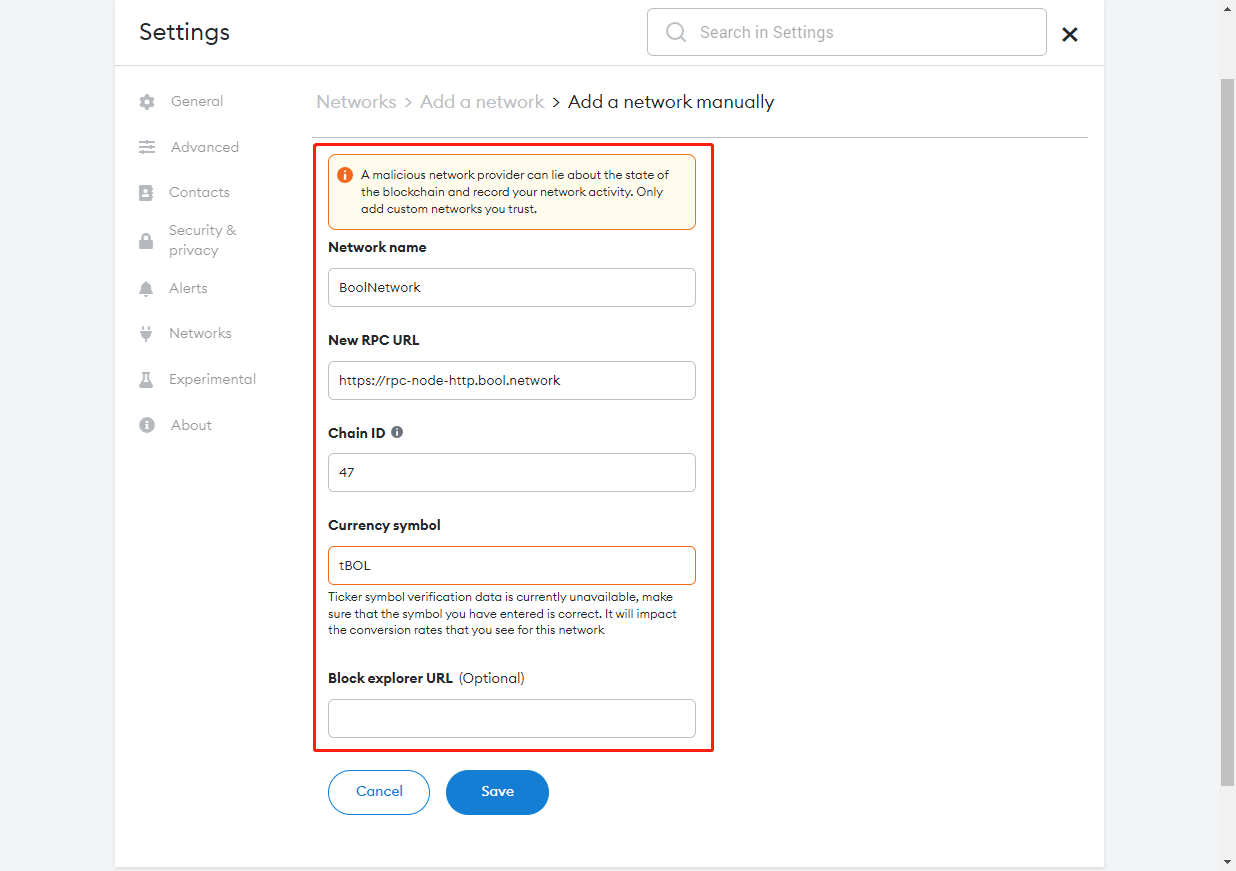
Finally, switch the network to BOOLNetwork, and you can start operations such as making a transaction on the BOOLNetwork network.
